Apollo Energy Asset Manager: Building a Full-Stack Renewable Energy Management Platform

Demo Video
Context
This project started as a take-home assignment from Apollo Green Solutions for a Full-Stack Developer position: design and build a complete web application to manage and monitor renewable-energy assets. The brief was short and deliberately open-ended:
- User authentication — registration, login, logout
- Users can create projects and add tasks to each project
- A backend REST API built with Laravel (PHP)
- A frontend dashboard built with React and TypeScript
- A PostgreSQL database with a consistent schema
- A README with installation instructions and design choices
I used it as an opportunity to go a bit further than the strict minimum — proper JWT auth with email verification, a Dockerized multi-service stack, and a UI I actually enjoyed building (the “Aenergi” branding you’ll see below is mine).
Tech Stack
| Layer | Technology |
|---|---|
| Backend | Laravel 12, PHP 8.4, tymon/jwt-auth for JWT auth, Eloquent ORM |
| Frontend | React 19, TypeScript, TanStack Start / TanStack Router, TanStack Query |
| Forms | React Hook Form + Zod schema validation |
| UI | Tailwind CSS v4, shadcn/ui (Radix primitives), @dnd-kit for the Kanban board |
| Database | PostgreSQL 17 |
| Cache / Queue | Redis 8 |
| Mail (dev) | Mailpit, to capture verification & password-reset emails locally |
| Web server | Nginx |
| Infra | Docker & Docker Compose |
Data Model
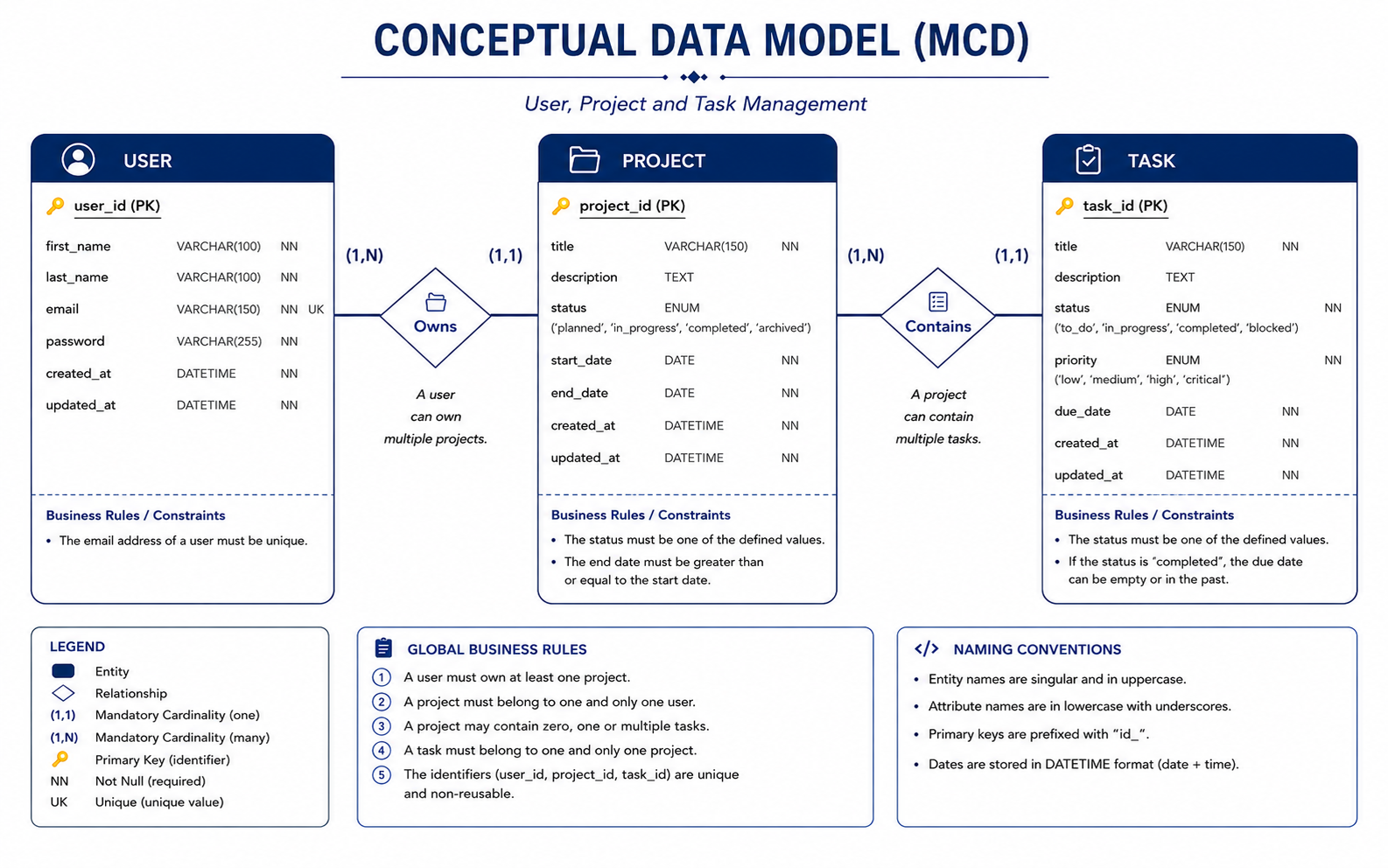
The application follows a simple relational model where each user owns multiple projects, and each project contains multiple tasks. The conceptual data model (MCD) below illustrates the entities, their attributes, and the relationships between them.
The design follows these principles:
- One User can own multiple Projects.
- One Project belongs to exactly one User.
- One Project can contain multiple Tasks.
- One Task belongs to exactly one Project.
- Email addresses are unique.
- Primary keys are custom identifiers (
user_id,project_id,task_id).
The final database schema was implemented using Laravel migrations and PostgreSQL while preserving this conceptual model.
Architecture
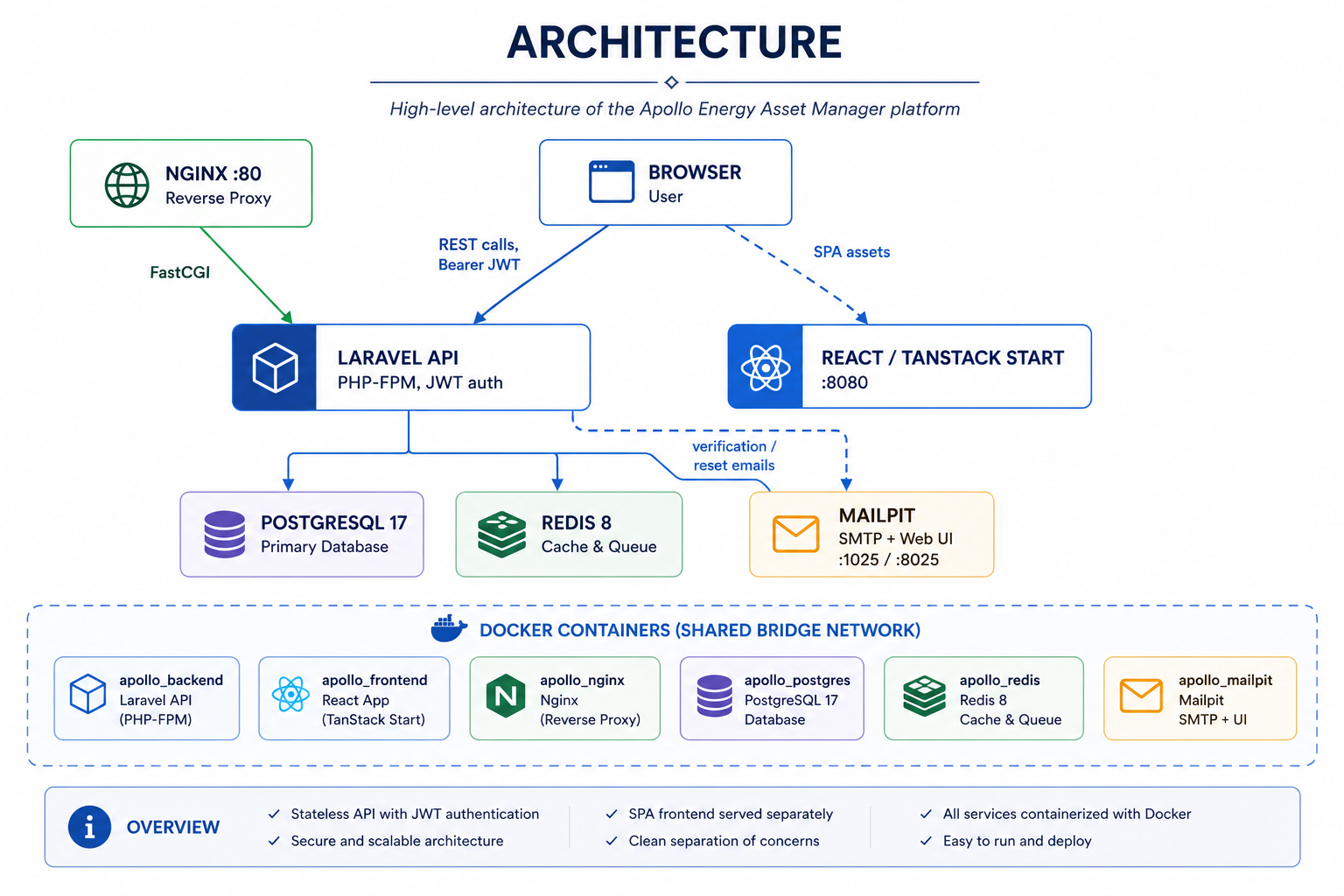
The application follows a modern containerized client-server architecture. The frontend and backend are deployed as independent services and communicate through a secure REST API protected with JWT authentication. Supporting services such as PostgreSQL, Redis, Mailpit, and Nginx complete the stack, providing data persistence, caching, email testing, and reverse proxy capabilities.
Architecture Overview
- Browser interacts with the React application and communicates with the backend through authenticated REST API requests.
- React / TanStack Start serves the Single Page Application (SPA) running on port 8080.
- Nginx acts as a reverse proxy and forwards PHP requests to Laravel through FastCGI.
- Laravel API handles authentication, business logic, validation, and database operations using JWT authentication.
- PostgreSQL 17 stores users, projects, tasks, and application data.
- Redis 8 provides caching and queue support to improve application performance.
- Mailpit captures verification and password-reset emails during development without requiring a real SMTP provider.
All services are isolated inside Docker containers and communicate over a shared bridge network.
| Container | Purpose |
|---|---|
apollo_backend | Laravel API (PHP-FPM) |
apollo_frontend | React / TanStack Start |
apollo_nginx | Reverse Proxy |
apollo_postgres | PostgreSQL Database |
apollo_redis | Redis Cache & Queue |
apollo_mailpit | SMTP Testing & Web Interface |
The complete development environment can be started with a single command:
1
docker compose up -d
1
2
3
4
5
6
7
[+] Running 6/6
 ✔ Container apollo_frontend   Running
 ✔ Container apollo_postgres   Healthy
 ✔ Container apollo_redis      Running
 ✔ Container apollo_backend    Running
 ✔ Container apollo_nginx      Running
 ✔ Container apollo_mailpit    Running
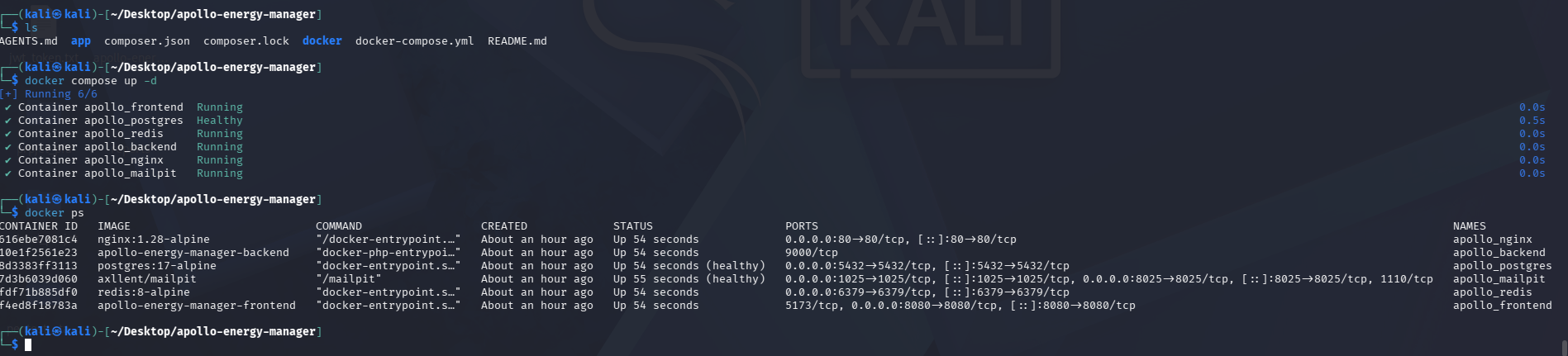
All application services are successfully deployed and connected through Docker Compose.
Backend: Authentication with JWT
Rather than session cookies (which get messy across two separately-hosted apps), the API is fully stateless and issues a JWT on login via tymon/jwt-auth. Registration validates the payload, hashes the password, creates the user, and immediately fires off a verification email:
1
2
3
4
5
6
7
8
9
10
11
12
13
14
15
16
17
18
19
20
21
22
23
24
25
26
27
28
29
30
31
32
33
34
public function register(Request $request)
{
    $validator = Validator::make($request->all(), [
        'first_name' => 'required|string|max:100',
        'last_name'  => 'required|string|max:100',
        'email'      => 'required|string|email|max:150|unique:users,email',
        'password'   => 'required|string|min:6',
        'phone'      => 'nullable|string|max:20',
        'job_title'  => 'nullable|string|max:100',
        'company'    => 'nullable|string|max:150',
    ]);

    if ($validator->fails()) {
        return response()->json($validator->errors(), 400);
    }

    $user = User::create([
        'first_name'     => $request->first_name,
        'last_name'      => $request->last_name,
        'email'          => $request->email,
        'password'       => Hash::make($request->password),
        'phone'          => $request->phone,
        'job_title'      => $request->job_title,
        'company'        => $request->company,
        'account_status' => 'active',
    ]);

    $user->sendEmailVerificationNotification();

    return response()->json([
        'message' => 'User successfully registered. A verification email has been sent to your inbox.',
        'user' => $user,
    ], 201);
}
Login rejects anyone whose email isn’t verified yet, which keeps the verification flow meaningful instead of decorative:
1
2
3
4
5
6
7
8
9
10
11
12
13
14
15
16
17
public function login(Request $request)
{
    $credentials = $request->only('email', 'password');

    if (!$token = auth()->attempt($credentials)) {
        return response()->json(['error' => 'Unauthorized - Wrong email or password'], 401);
    }

    $user = auth()->user();

    if (is_null($user->email_verified_at)) {
        auth()->logout();
        return response()->json(['error' => 'Please verify your email address before logging in.'], 403);
    }

    return $this->respondWithToken($token);
}
In local development, every verification and password-reset email lands in Mailpit instead of an inbox, so I can test the whole flow — including reset-link expiry — without a real SMTP provider:
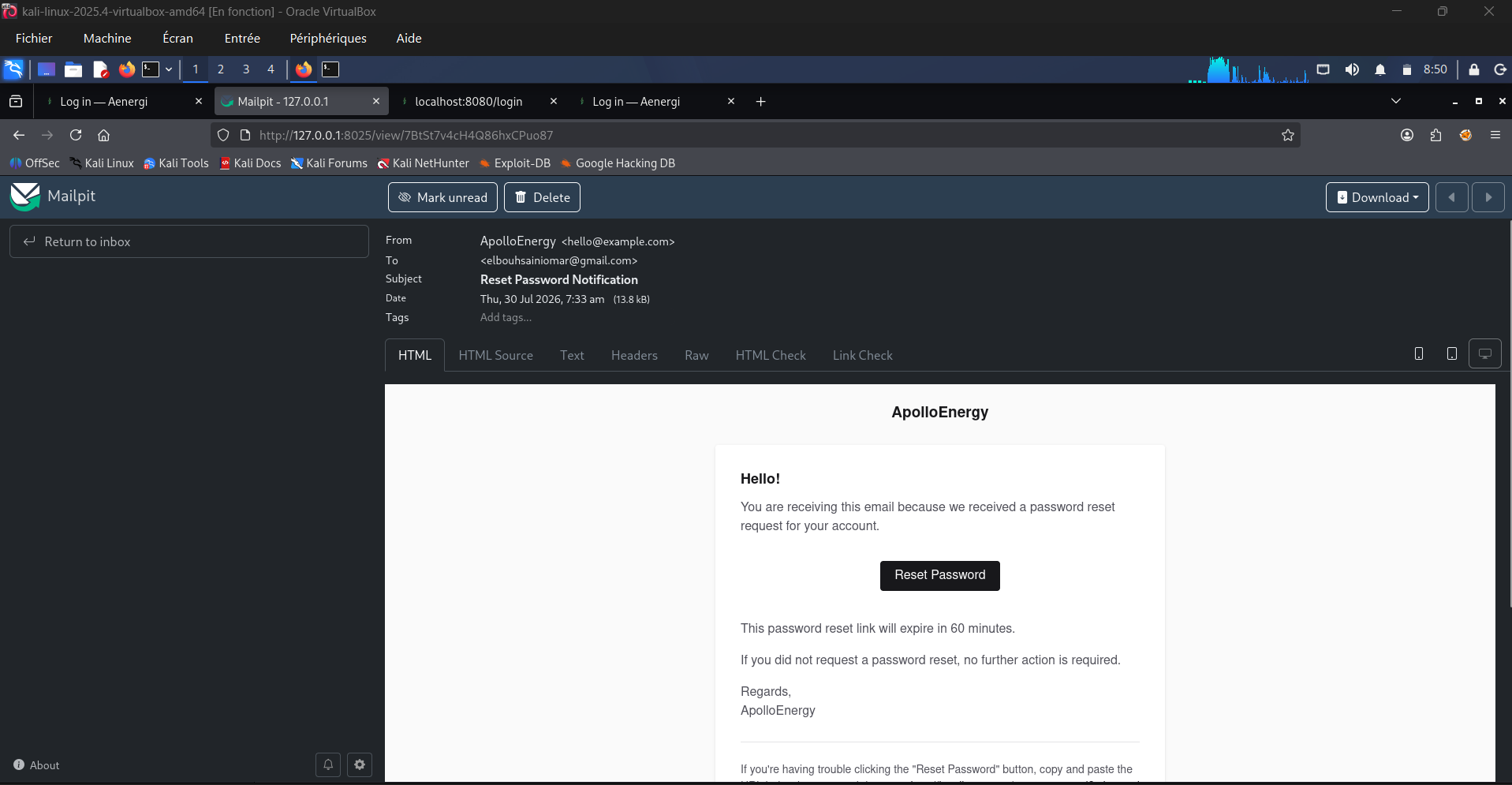 A reset-password email captured by Mailpit during local testing — the link is fully clickable and points back at the frontend.
The User model implements JWTSubject so tymon/jwt-auth knows how to mint tokens for it, and MustVerifyEmail so Laravel’s built-in verification notification machinery just works:
1
2
3
4
5
6
7
8
9
10
11
12
13
14
15
16
17
18
19
20
21
22
23
class User extends Authenticatable implements JWTSubject, MustVerifyEmail
{
    use HasFactory, Notifiable, SoftDeletes;

    protected $primaryKey = 'user_id';

    protected $fillable = [
        'first_name', 'last_name', 'email', 'password',
        'phone', 'avatar_path', 'job_title', 'company', 'account_status',
    ];

    protected $hidden = ['password', 'remember_token'];

    public function getJWTIdentifier()
    {
        return $this->getKey();
    }

    public function getJWTCustomClaims(): array
    {
        return [];
    }
}
Backend: Ownership-Scoped CRUD
Every Project and Task endpoint filters by the authenticated user’s ID, so a user can never read or touch another user’s data — there’s no separate authorization layer yet, the scoping just happens at the query level:
1
2
3
4
5
6
7
8
9
10
11
12
13
14
15
16
17
18
19
20
21
22
23
24
25
26
27
28
29
30
31
32
33
34
35
36
37
38
39
40
41
42
43
44
45
46
47
48
class ProjectController extends Controller
{
    public function index()
    {
        $projects = Project::where('user_id', auth()->id())->get();
        return response()->json($projects);
    }

    public function store(Request $request)
    {
        $validator = Validator::make($request->all(), [
            'title'       => 'required|string|max:150',
            'description' => 'nullable|string',
            'status'      => 'required|in:planned,in_progress,completed,blocked',
            'start_date'  => 'required|date',
            'end_date'    => 'nullable|date|after_or_equal:start_date',
        ]);

        if ($validator->fails()) {
            return response()->json($validator->errors(), 400);
        }

        $project = Project::create([
            'user_id'     => auth()->id(),
            'title'       => $request->title,
            'description' => $request->description,
            'status'      => $request->status,
            'start_date'  => $request->start_date,
            'end_date'    => $request->end_date,
        ]);

        return response()->json($project, 201);
    }

    public function show($id)
    {
        $project = Project::where('project_id', $id)
                          ->where('user_id', auth()->id())
                          ->first();

        if (!$project) {
            return response()->json(['error' => 'Project not found'], 404);
        }

        return response()->json($project);
    }
    // update() and destroy() follow the same ownership-check pattern
}
Task follows the same shape, with the added twist that creating or reassigning a task re-verifies that the target project_id actually belongs to the caller before attaching it — so you can’t sneak a task onto someone else’s project by guessing an ID.
The Project model itself is intentionally small — just the relationships and the fillable fields:
1
2
3
4
5
6
7
8
9
10
11
12
13
14
15
16
17
18
class Project extends Model
{
    use HasFactory, SoftDeletes;

    protected $primaryKey = 'project_id';

    protected $fillable = ['user_id', 'title', 'description', 'status', 'start_date', 'end_date'];

    public function user()
    {
        return $this->belongsTo(User::class, 'user_id', 'user_id');
    }

    public function tasks()
    {
        return $this->hasMany(Task::class, 'project_id', 'project_id');
    }
}
Frontend: React + TypeScript + TanStack
The frontend is a React 19 app on TanStack Start (file-based routing via TanStack Router), with all server state managed through TanStack Query — no Redux, no manual useEffect fetching. A single Axios instance attaches the JWT to every request and clears it automatically on a 401:
1
2
3
4
5
6
7
8
9
10
11
12
13
14
15
16
17
18
19
20
const baseURL = (import.meta.env.VITE_API_URL as string | undefined) ?? "http://localhost:8000/api";

export const api = axios.create({ baseURL, headers: { Accept: "application/json" } });

api.interceptors.request.use((config) => {
  const token = getToken();
  if (token) config.headers.Authorization = `Bearer ${token}`;
  return config;
});

api.interceptors.response.use(
  (r) => r,
  (error: AxiosError) => {
    if (error.response?.status === 401 && onUnauthorized) {
      clearToken();
      onUnauthorized();
    }
    return Promise.reject(error);
  },
);
Forms are validated client-side with Zod schemas via React Hook Form, and if the backend still rejects something with a 422, applyValidationErrors() maps each field-level error straight back onto the form — so server and client validation stay in sync from the user’s point of view, even though they’re two separate schemas under the hood.
The auth screens
Sign-in and sign-up are the first thing anyone sees, so I spent real time on the visual identity (“Aenergi — Your Energy Management System”) rather than shipping default shadcn styling as-is:
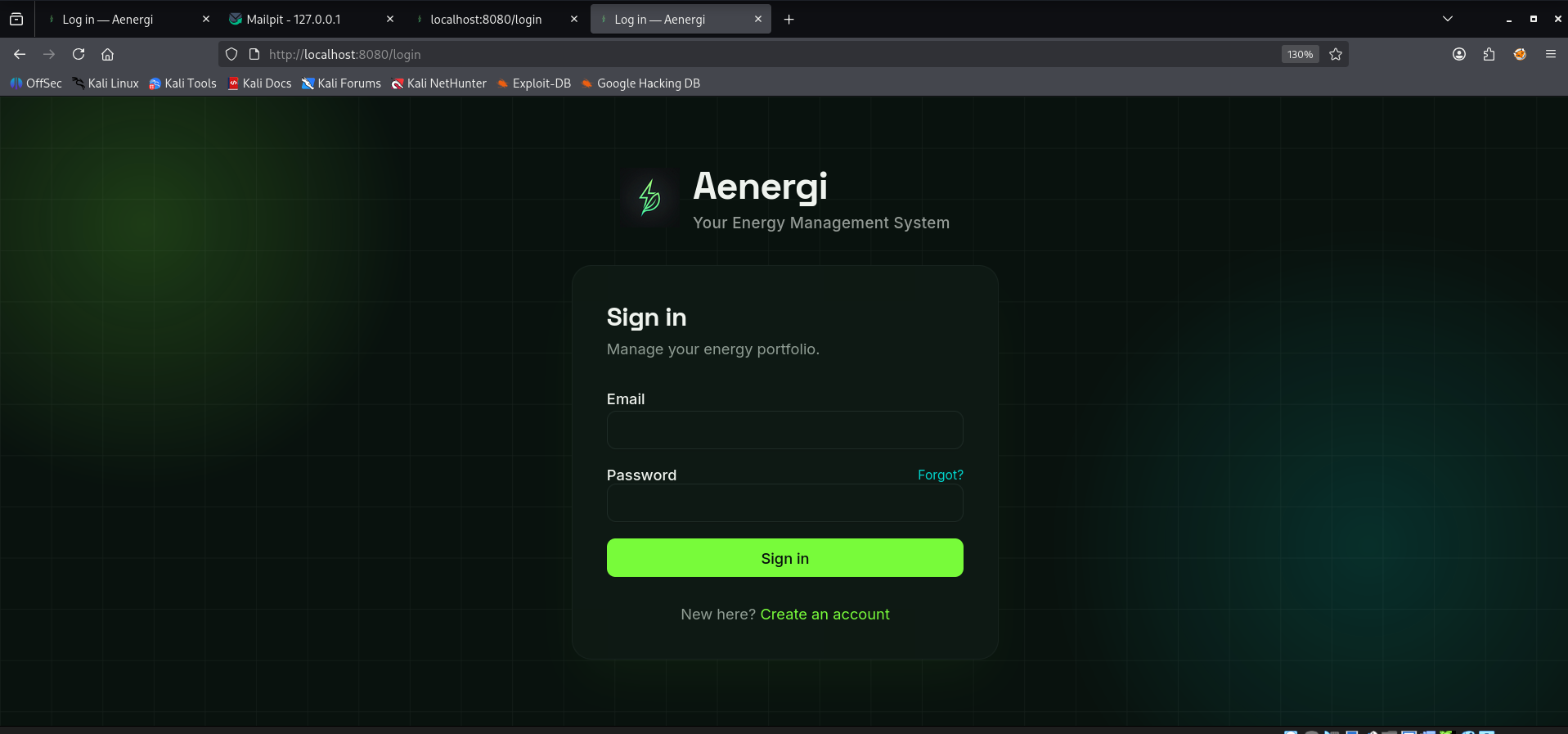 The sign-in screen — dark theme, energy-green accent, clean two-field form.
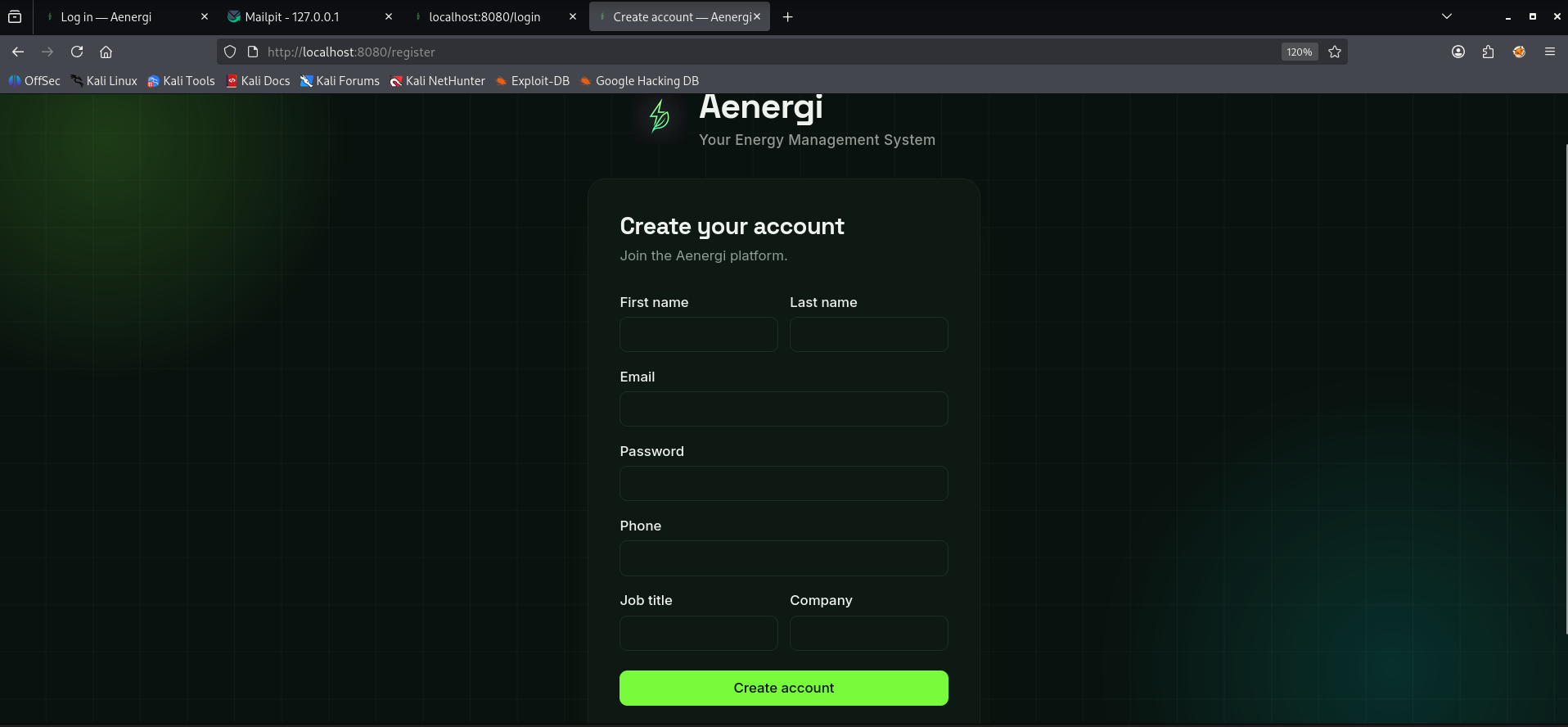 Registration collects a bit more context (job title, company) than strictly required, since this is meant for people managing real energy assets, not just a demo login.
Kanban board and dashboard
Beyond the two screens above, the authenticated part of the app includes:
- A dashboard with live KPI cards (total/active projects, total/overdue tasks, completion rate) computed from the current project and task data.
- A Kanban board for tasks, built with
@dnd-kit, with an optimistic-update hook so dragging a card to a new column updates the UI instantly and only rolls back if the API call actually fails. - A task list view with client-side search, status filter, and priority filter.
Running It Locally
The whole stack comes up with one command once the .env files are in place:
1
2
3
4
5
6
7
8
git clone https://github.com/omar21123/apollo-energy-manager.git
cd apollo-energy-manager

docker compose up -d --build

docker exec -it apollo_backend php artisan key:generate
docker exec -it apollo_backend php artisan jwt:secret
docker exec -it apollo_backend php artisan migrate
From there: the frontend is on http://localhost:8080, the API on http://localhost/api, and Mailpit’s inbox on http://localhost:8025 to watch verification/reset emails arrive in real time.
What I’d Improve Next
Being transparent about the current limitations, since that’s as much a part of the write-up as the parts that work well:
- No role-based access control yet — every account is equal; an admin/manager role would be a natural next step given this targets asset management.
- No server-side pagination or filtering — search/filter/sort currently happen client-side on the full dataset, which won’t scale past a few hundred projects/tasks.
- No automated test suite yet — the CRUD and auth flows are manually verified; adding Feature tests for ownership boundaries (user A can’t touch user B’s project) is next on the list.
- A proper CI pipeline (GitHub Actions running the test suite and a frontend build on every push) would close the loop.
Repository: github.com/omar21123/apollo-energy-manager